

Digital khata and customer credit for your shop
Many shops sell on credit to regular customers. AIFFICIENTO keeps every khata entry in one place, with credit limits, payments and statements, so you always know who owes what.
30 days free No credit card Every feature included
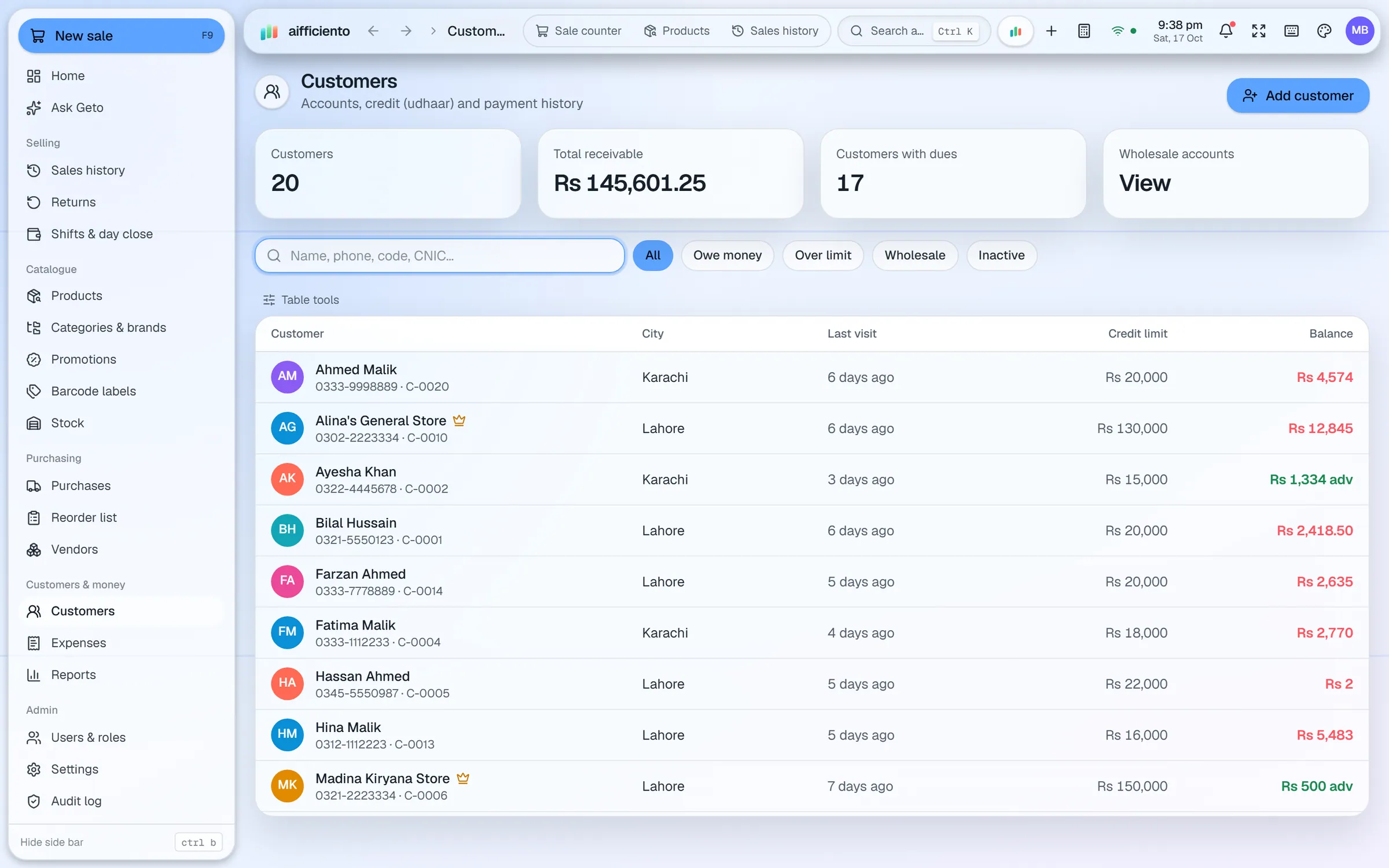
Open an account for each regular customer, with their contact details and their sales history.
Set a credit limit for each customer, so credit sales stop at the level you decide.
Take part of a bill on credit by using a split payment with cash, card, wallet or customer credit.
Record each payment when a customer pays back some or all of their udhaar.
Print or export a statement that lists a customer’s sales, payments and balance.
Balance reminders help you follow up with customers who are overdue, and customer dues appear on the dashboard.
In many kiryana and baqala shops, the khata is the most important book in the shop. It records who bought on credit, how much they owe and when they paid. AIFFICIENTO keeps the same record inside the POS, so the khata is always up to date.
Opening an account
Each regular customer gets an account with their name and contact details. From the account you see every credit sale, every payment and the running balance. Local terms like udhaar, khata and ajil work naturally here, because the software keeps the record the way your shop already does.
Credit at the counter
When a customer buys on credit, use a split payment. Part of the bill can be paid in cash, and the rest goes to the customer’s credit. A credit limit stops the balance from growing beyond the level you have set for that customer.
Payments and statements
When a customer pays back some or all of their balance, record the payment against the account. The balance updates straight away. A statement shows every sale and payment for a period, which is useful when a customer asks what they owe.
Following up
Balance reminders show which customers are overdue. The customer dues figure also appears on the live dashboard and in the customer dues report, so the owner sees the total at a glance.
Keep it fair
Set credit limits you can stand behind, and record every payment on the day it arrives. A khata works best when the entries are complete, and the software makes that easy at the counter.
Questions, answered
What is a khata app?
Can I set a credit limit for each customer?
Can a customer pay partly in cash and partly on credit?
Where do I see who owes money?
Can I try the khata before I pay?
Guides & articles
All articlesDigital Khata and Udhaar Management for Pakistani Shops
How to run udhaar and khata in your shop: set a credit policy, keep clean records, send reminders, and pick a khata app or a POS with built-in credit.
Read guide →Best POS Software in Pakistan: How to Choose in 2026
How to choose POS software in Pakistan: key criteria, offline desktop vs cloud, a 30-minute demo checklist, and where AIFFICIENTO fits. October 2026.
Read guide →POS Software in Bangladesh: VAT, Mushak 6.3 and EFD Basics
POS software in Bangladesh as of October 2026: Mushak 6.3 VAT invoices, the status of e-invoicing and NBR EFD devices, offline billing and a checklist.
Read guide →Your next chapter starts at the counter.
Try every feature free for 30 days. No credit card. Bring your products, ring up a bill, ask Geto a question.
Windows 10/11 · Android app · works offline · any currency